
انضم إلى برنامج موزعي بوبو على PoppoTopup


اللغة العربية
USD


سجّل للحصول على قسائم خصم 5%!
كيف تستخدم قسائم الخصم على منصة Poppotopup؟
2026-07-01 15:21:42
إذا أردت تقليل تكلفة شحن عملات بوبو لايف، فعليك إتقان طريقة استخدام قسائم الخصم ورموز العروض الترويجية. الكثير من مستخدمي بوبو يقومون بإرسال الطلبات مباشرة دون فهم قواعد الخصم على المنصة، مما يجعلهم يفوتون فرص التوفير. اليوم سنقوم بإرشادك خطوة بخطوة حول كيفية استخدام واسترداد القسائم على منصة Poppotopup.
كيفية استخدام كوبونات بوبو؟
تُساعدك الخصومات التي يُقدمها تطبيق بوبوتوب أب على توفير الكثير عند شراء عملات بوبو. مع ذلك، لاحظنا أن العديد من مستخدمي بوبو لا يعرفون كيفية الحصول على الكوبونات. لا داعي للحصول على الكوبونات يدويًا على بوبوتوب أب؛ يمكنك الاطلاع على جميع قسائمك المتاحة في قسم "قسائمي". هل تتساءل عن كيفية استخدام الكوبونات أثناء شحن رصيد بوبو لايف؟ اتبع هذه الخطوات البسيطة:
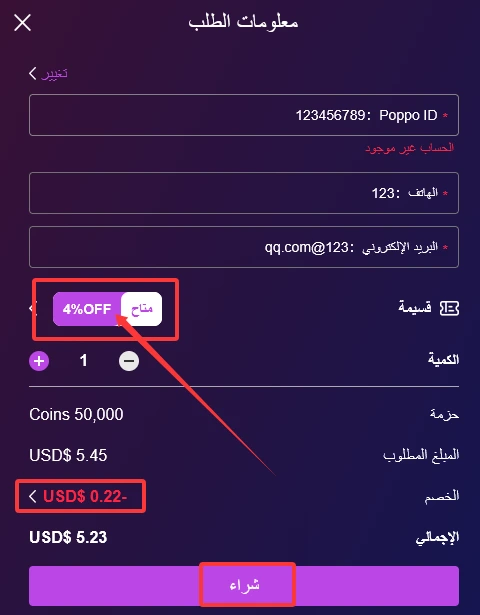
- اختر باقة بوبو التي ترغب بشرائها (بدون خصم) واضغط على "شراء"؛
- في صفحة تفاصيل الطلب، سيختار النظام تلقائيًا أول كوبون متاح لديك. يمكنك الضغط على زر "متاح" في قسم الخصومات للانتقال إلى كوبونات أخرى؛
- بعد تأكيد الخصم الذي تفضله، أكمل عملية الدفع وانتظر حتى يُضيف النظام عملات بوبو إلى رصيدك.
ما هي باقات Poppo التي تدعم القسائم؟
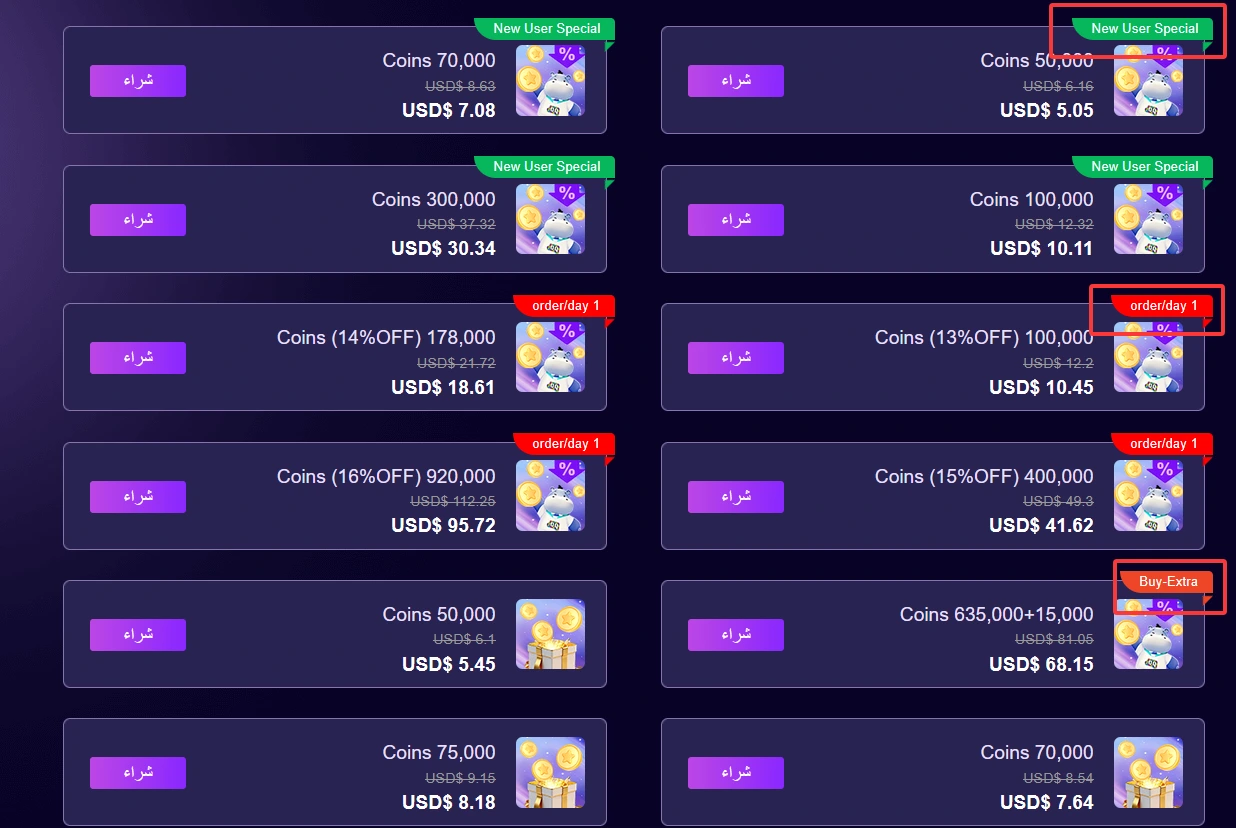
عادةً ما يختار المستخدمون الذين لا يحتاجون إلى الكثير من عملات Poppo باقات Poppo المخفضة، مثل باقة المستخدم الجديد الحصرية، وباقة الشراء الفردي اليومي، وباقة الشراء الإضافي، وغيرها. تأتي هذه الباقات بسعر مخفض مسبقًا، لذا لا يمكن استخدام القسائم معها.
إذا كنت تشارك بانتظام في فعاليات Poppo Live وتحتاج إلى كمية كبيرة من عملات Poppo، فلن تلبي الباقات المخفضة احتياجاتك. ننصحك بشراء الباقات غير المخفضة مع القسائم لتوفير المزيد.
كيف تميز بين الباقات المخفضة والباقات العادية؟
أي باقة تحمل علامة في الزاوية العلوية اليمنى هي باقة Poppo مخفضة ولا تدعم استخدام القسائم. أما الباقات التي لا تحمل أي علامة فهي باقات عادية غير مخفضة، ويمكن استخدام القسائم معها كالمعتاد.
كيفية استخدام رمز القسيمة؟
بالإضافة إلى قسائم النظام التي تُصدر تلقائيًا، يُقدم موقع Poppotopup أيضًا رموزًا ترويجية حصرية. إذا تلقيت رمزًا ترويجيًا، فاتبع هذه الخطوات البسيطة لتحويله إلى قسيمة قابلة للاستخدام:
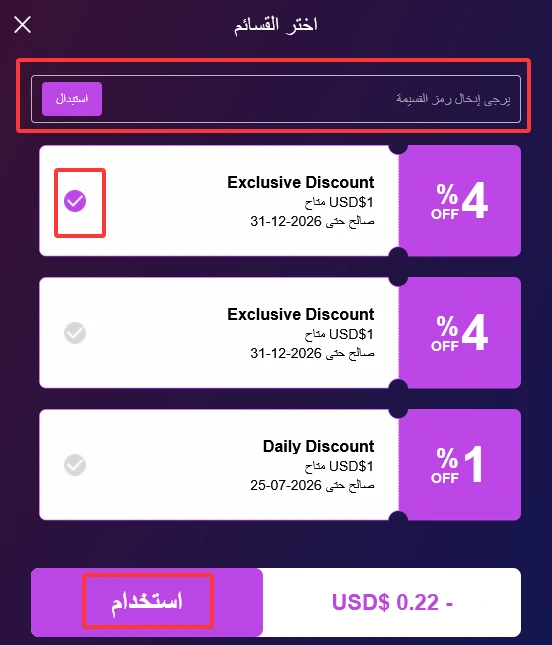
- ابحث عن قسم القسائم في صفحة معلومات الطلب؛
- انقر للدخول إلى صفحة القسائم؛
- أدخل رمز الخصم في خانة الإدخال العلوية، ثم انقر على "استخدام"؛
- بمجرد استخدام القسيمة بنجاح، سيتم اختيار القسيمة الجديدة تلقائيًا، وسيسري الخصم فورًا.
كيفية الحصول على خصومات عند شحن رصيد Poppo؟
يبحث معظم المستخدمين عن خدمات شحن رصيد Poppo Live بأسعار منخفضة. تُعلن العديد من منصات شحن رصيد Poppo عن أسعار منخفضة للغاية لجذب العملاء، إلا أن السعر النهائي غالبًا ما يكون أعلى بكثير من المتوقع. يُقدم Poppotopup أقل الأسعار في السوق، مع خصومات تُطبق على كل طلب شحن رصيد Poppo. إليك جميع طرق الحصول على القسائم:
- قسائم يومية: حتى في غير أوقات العروض الترويجية، ستحصل على قسيمتي خصم ثابتتين بنسبة 1% و2% على التوالي لتوفير المال.
- يوم الأعضاء الحصري الشهري: يُخصص يوم 24 من كل شهر لأعضاء Poppotopup، حيث تُقدم أكبر قسائم الخصم لهذا الشهر.
- عروض لفترة محدودة: بالإضافة إلى العروض العادية، تُطلق المنصة بانتظام حملات حصرية قصيرة الأجل مع قسائم خاصة لفترة محدودة.
- حملات خاصة بالأعياد: خلال العطلات الرسمية، يُطلق Poppotopup فعاليات شحن رصيد خاصة مع قسائم قيّمة لفترة محدودة.

ملخص
هذا دليل شامل يشرح كيفية استخدام القسائم واستردادها والحصول عليها على منصة Poppotopup. تجنب الطلبات العشوائية عند حاجتك إلى شحن رصيد Poppo Coins. تعرّف على شروط الباقات المخفّضة واستفد من الخصومات المتاحة، لتتمكن من شراء Poppo Coins بأسعار مناسبة طوال العام.